Peter Bargh

Sights & Sounds
January 10th, 2014

Lightroom error when trying to delete images

Do you see an error message

The file named “xxxxxx.xxx” could not be moved to the Recycle Bin

when you try to delete a photo from your Lightroom catalogue
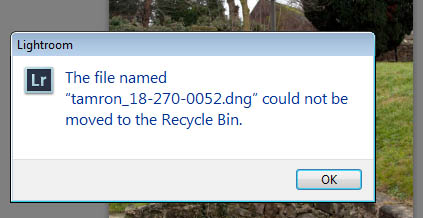
lightroom-delete-image-error

One way around this is to delete the file from the Windows directory and then go back to Lightroom and delete the catalogued image thumbnail. But that’s a work around and painfully slow. The better approach is to run Lightroom at Administrator level, as some files need Admin-level to be deleted.

Close Lightroom and reopen, but this time right-click the Lightroom icon and choose “Run as Administrator”

Now when you chose delete from within Lightroom the file will be deleted.

May 31st, 2012

Lightroom 4.1 wont install

If  you have a version of Lightroom and the alert comes to tell you that a new version is available, so you down load and then when trying to run the .exe file you get the error message you may find it a struggle to find the solution.

I had this issue and the Adobe solution is to download a fresh instal.

I was running a 4.1 Beta upgrade from the original 4.0 install. I tried a second download and it didn’t work. I couldn’t find the answer online so I decided to uninstall my 4.1 Beta install and delete my 4.1 download .exe.

I then reinstalled my 4.0 off the disc, re downloaded the 4.1 update and click the .exe and this time it worked.

Hope this helps a few who’re in the same situation

If it helps please link to this thread in the forums you use to help others. 🙂