Peter Bargh

Sights & Sounds

Archive for the ‘Helping Hand’ Category

February 13th, 2026 by Peter Bargh

How to batch convert PDF files to JPG on a MAC

I was looking for a simple way to convert a bunch of pdf files into jpg files the Mac. I had a few hundred to do so didn’t want to do each one individually and I also didn’t want to use an online converter.

For those who don’t know (I didn’t) you can set up a simple converter using one of the many standard issue Macs Apps – Automator. 

Automator has a list of actions already built. The Render PDF Pages to Images action is one of them. 

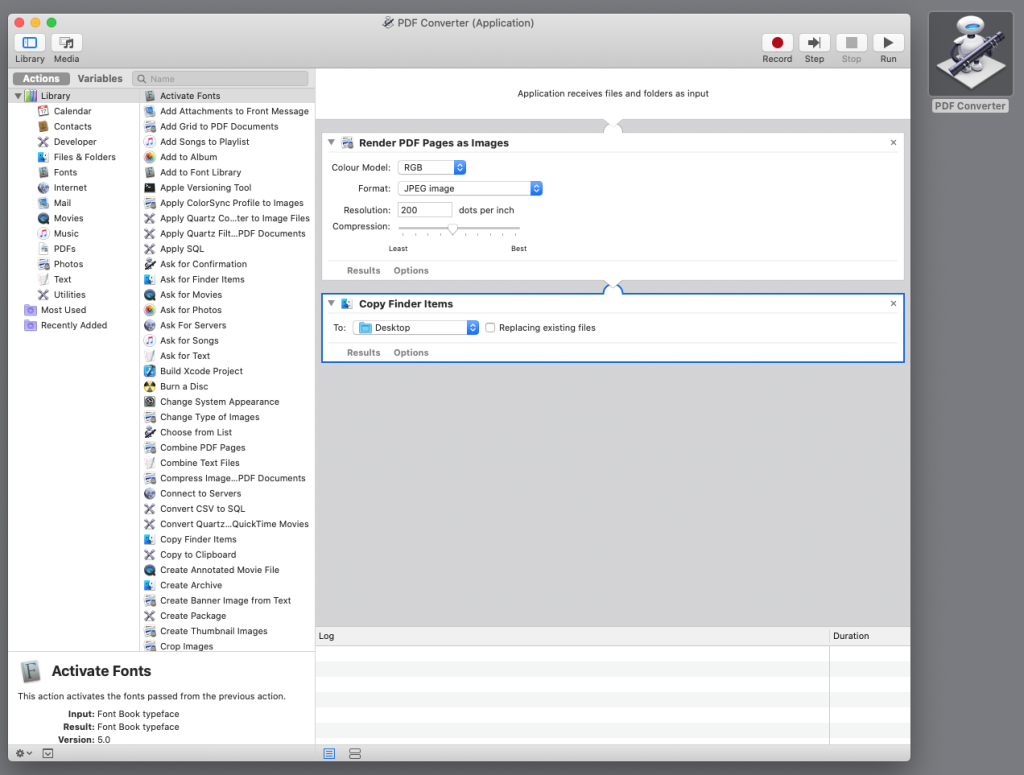
Here’s how to write a PDF to JPG conversion program 
  • 1 Open Automator 
  • 2 Select File>New a wizard pops asking you to choose a “type of document”
  • 3 Select Application and click Choose
  • 4 Scroll down the long list of options on the left and find “Render PDF Pages to Images” 
  • 5 Drag this action into the space on the right 
  • 6 Select JPEG (notice all the other file formats that you can convert to) and a compression (quality) level 
  • 7 Drag “Copy Finder Items” over to the workflow and select where you want the files saved
  • 8 Save the action on your desktop File>Save

Now you will have an automator icon, simply select a number of PDF file thumbnails and drag them over the icon to convert and save in your chosen directory. 
March 22nd, 2014 by Peter Bargh

How to remove iPhone red dot message alert

Have you recently found the red  dot above your iphone’s home screen green phone icon is not disappearing when you’ve check and deleted all your answer phone messages?

It seems it’s a quite common issue, but most of the answers on various forums don’t resolve the problem.

These include

    • Turning off cellular (Mobile) data
    • Turning it on and off again
    • Holding down the home screen button and the on / off switch to reset.
    • Calling your phone company and listing to the messages

None of these worked for me!

and I didn’t want to attempt another suggestion and do a complete factory rest of the phone

I found the answer was to phone my iphone from another phone and leave a message. Then call the message centre and listen to and delete the message.  The red dot went.

Hope that helps

February 13th, 2014 by Peter Bargh

Permalink changes lock you out of WordPress Admin?

I had this problem and couldn’t work out what I’d done wrong

I installed WordPress in a .com/blog directory

It all went well. I could log in to admin and I could see the live blog. Then I went into Settings>Permalinks to change Default to Post Name and then when I saved changes I was directed to the log in page and the log in no longer let me in…and the public side didn’t work either.

If this happens to you it’s likely there’s something wrong with the .htaccess file and here’s a quick fix

delete your current .htaccess in the /blog directory
upload a new blank replacement .htaccess
set chmod permissions to 666
Log in to wp-admin and set permalinks to desired url structure
Return to .htaccess file and set permissions back to 644 for security

It should now work correctly

February 12th, 2014 by Peter Bargh

Hide your email address on Web Pages

The catch 22 of displaying your email address on your web site is that the spammers will soon find it and your inbox will be filled with Viagra, Ugg boots and Penis enlargement emails even if you are a girl!

I have avoided displaying the emaill address in favour of a contact form but it’s not ideal because some visitors would prefer the standard email approach.

I found a really informative tech guy who’s posted a selection of methods sharing code that will Hide your Email Address on Web Pages.

You only need to have a very basic understanding of coding to implement any of these options.

January 30th, 2014 by Peter Bargh

Seo Tips

Some really good myth busting tips and tricks to improve your site SEO. Surprising to read many of the techniques that the SEO gurus have been recommending for years are probably less valid than you think.

January 29th, 2014 by Peter Bargh

Really useful htaccess tips

I was finding how to prevent a page being viewed via a line in the htaccess file and stumbled upon this really good collection of htaccess tips and tricks. I’ve added a few other to my htaccess file.

January 10th, 2014 by Peter Bargh

Lightroom error when trying to delete images

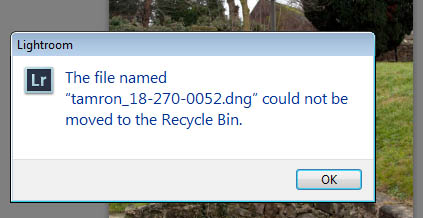
Do you see an error message

The file named “xxxxxx.xxx” could not be moved to the Recycle Bin

when you try to delete a photo from your Lightroom catalogue

lightroom-delete-image-error

One way around this is to delete the file from the Windows directory and then go back to Lightroom and delete the catalogued image thumbnail. But that’s a work around and painfully slow. The better approach is to run Lightroom at Administrator level, as some files need Admin-level to be deleted.

Close Lightroom and reopen, but this time right-click the Lightroom icon and choose “Run as Administrator”

Now when you chose delete from within Lightroom the file will be deleted.

September 25th, 2013 by Peter Bargh

cURL extension required

I’m installing OpenCart on a localhost WAMP server.

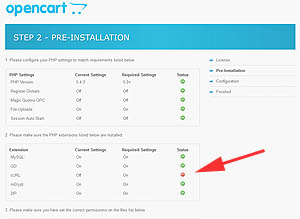
I came across an error at Step 2 of the Pre-Installation stage

opencart-installThe status for Extensions showed a red – against cURL.

After a bit of Google research several options were found.

One was to enable cURL extension by going to the php.ini file and removing the semi colon in front of the line

extension=php_curl.dll

In my case that was already removed so the extension was supposedly enabled

Next check the the localhost index/menu page for loaded extensions.  I noticed that curl was not listed

After checking the php.info page (accessed from localhost index/menu page) details of curl were missing

I then read that I may have the curl extension. Apparently you need the one to match your php install. So I checked my version of php (found on the localhost index/menu page) 5.4.3 and downloaded the equivalent Fixed curl extension from here: http://www.anindya.com/php-5-4-3-and-php-5-3-13-x64-64-bit-for-windows/
Once unzipped the php_curl.dll file needs to be placed in the ext folder of php. C/wamp/bin/php/php5.4.3/ext

That worked and replaced the red error with the necessary green tick.

September 12th, 2013 by Peter Bargh

Logitech Duet – player not found

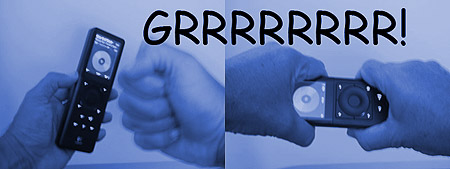
Why not I can see it!!!!!!

Have you been struggling to connect your Logitech Media player to your network so you can play music from your computer on your hifi – I have too. No matter how much you search all you find is more and more people with the same problem and an endless stream of answers and you try all the suggested things and it still doesn’t connect? Yes me too.

A seven step switch off and on routine with a rest to factory default didn’t work

Changing WAP to WEP didn’t work

Rebooting Router didn’t work

Taking out controller battery and checking MAC no didn’t work

Setting Router to different settings didn’t work

Moving Router / controller / player didn’t work

Going back / or forward on the operating system didn’t work

So here’s the definite answer to get the Logitech DUET working.

1 Unplug the Logitech Reciever

2 Switch off the Logitech controller

3 Hold the controller in the left hand and place you right hand on your left shoulder

4 Raise your left leg and place your foot in a yoga position on you right knee

5 Do not lose balance!!!!

6 Close your eyes and think of a nice place

7 Stay in the position  for 23 minutes

8 hopefully when you switch back on and try to connect it will now work – it has as much chance as any of the other suggestions!!!!

9  If not, go and search some more forums for another solution feeling far more relaxed

OLYMPUS DIGITAL CAMERA

Seriously Logitech really need to sort this out. I have a TV with an internet USB dongle. The Logitech player was picked up on that and I didn’t have to do anything. I can play music on my TV so why not on my HIFI?!!!

Illogitech! That’s why

There’s a saying RTFM (read the f***ing manual) And I would certainly advice that with this product. Most of what’s repeated in the forums is what’s already in the manual…and on one occasion doing what was suggested in there did get me back up and running, but the correct procedure doesn’t work every time. http://www.logitech.com/images/pdf/userguides/eng/Logitech_Squeezebox_Duet-ENG.pdf

September 6th, 2013 by Peter Bargh

double quotes replaced by backslash on mysql update

I had a situation where I had to export a set of records from a MYSQL database on a live site into a copy database on a localhost site. After successfully making the export / import I found all the picture and url links on the WordPress posts broken. Closer inspection relieved that the import had replaced all the necessary double quotes around links, styles, etc had been replaced with backslashes.


If you’re in the same position there’s a quick remedy. the following myqsl statement will find and replace

copy it and change the italic parts to match your set up

UPDATE your table name SET your field name = replace(your field name, ‘\’, ‘”‘);